


iMyFone MagicVoice
Please click the user icon in the upper right corner of the software interface, and
a login panel will pop up for registration.
Please log in with your licensed email and license code (which will be sent to your
licensed email within minutes after you've purchased MarkGo from us).
To buy from us, please go to the purchase page .
The free version of MarkGo includes all the same features as the paid version. The
only difference is that the you can export the videos
and images in the paid version. When you try to export a video or an image in the
free version,
a window will appear to tell you that you will need to update for this exporting
feature. To export the videos or images, please upgrade your plan.
You cannot change the registered email or iMyFone ID/account. If you have forgotten
your account & password,
please contact our support group by email at
markgo@imyfone.com and tell us your
purchase ID. Our support group will reply and help you.
No. MarkGo can only support Windows 7/Windows 8.1/Windows 10 (64 bit OS).
Yes, MarkGo allows you to use software with its watermark removing and adding
features without the need of a network connection.
To cancel the auto-renewal, please follow the simple instructions here to cancel by
yourself.
You can also contact our support group by email at markgo@imyfone.com and we will cancel for
you.
-
-
Star Product
Research
-
-
-
Star Product
Research
-
-
Free Online Tools
-
Support
 Support Center
Guides, faqs, license, contact
-
-
 Login and claim more exclusive discounts.
-
Page Not Found
We Are Here to Help






 Click here to install
Step 1:
Click this icon on [browser tab bar]


Step 2:
Find "voxbox_mac_setup-com_filme.zip", click to install
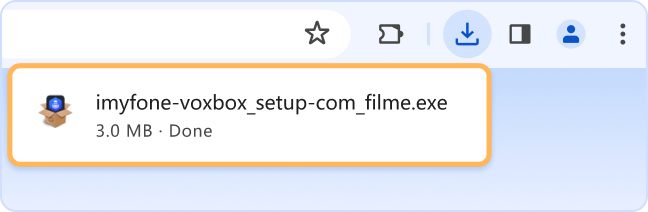

Don't Wait – Install Now and Get Started!
Free text to speech characters for you today. Install and you'll be amazed!
-
-
Star Product
Research
-
-
-
Star Product
Research
-
-
Free Online Tools
-
Support
Support CenterGuides, faqs, license, contact
-
-
Login and claim more exclusive discounts.
-
Page Not Found
We Are Here to Help
Click here to install
Step 1:
Click this icon on [browser tab bar]
Step 2:
Find "voxbox_mac_setup-com_filme.zip", click to install
Don't Wait – Install Now and Get Started!
Free text to speech characters for you today. Install and you'll be amazed!